
如何用 Kotlin 从 Android WebView 获取 Cookie:完整指南

开发者们好!👋 今天我们来深入聊聊如何在 Android 中用 Kotlin 从 WebView 获取 Cookie。无论你的 App 需要会话数据还是其他关键信息,懂得如何正确管理和获取 Cookie,对提升用户体验都很重要。我们开始吧,一步步来!
为什么要从 WebView 获取 Cookie?
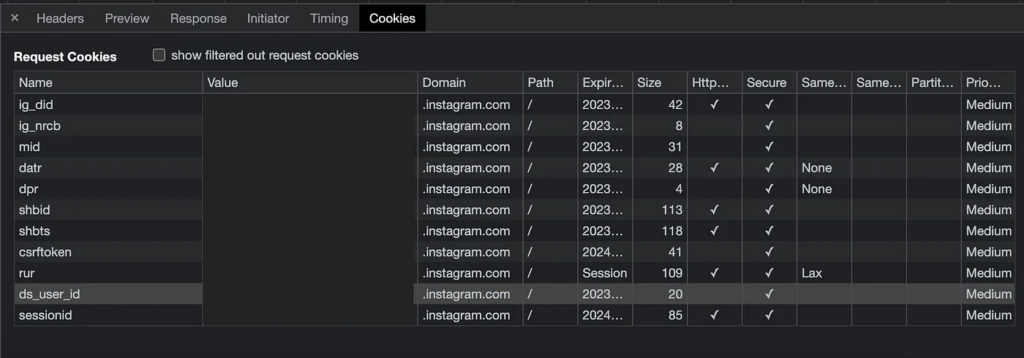
在深入技术细节之前,先说清楚为什么要从 WebView 获取 Cookie。在大多数 Web 应用中,Cookie 用来存储少量数据,可能包括:
会话数据:让用户保持登录状态,无需重新输入账号密码。
用户偏好:保存语言、主题等设置。
身份验证令牌:用于维持安全、持久的登录会话。
对于用 WebView 嵌入网页的移动 App,读取 Cookie 可以帮助同步网页和 App 的会话。比如,如果你的 App 需要通过网页登录,并且想在 App 中保持这个会话,就得和 Cookie 打交道。这就引出了下一个话题:如何配置 WebView。
配置 WebView 组件
首先,你需要在 App 的布局中添加一个 WebView。下面是在 activity_main.xml 布局文件中定义它的方法:
<WebView
    android:id="@+id/webView"
    android:layout_width="match_parent"
    android:layout_height="match_parent"/>
定义好 WebView 之后,我们给它加载一个 URL。这里以 Instagram 的登录页面为例,它会在 WebView 中加载这个网页。
binding.webView.loadUrl("https://www.instagram.com/accounts/login/")为什么用 Instagram?因为 Instagram 的登录页面是用 Cookie 存储会话数据的典型例子,很适合用来理解 WebView 如何处理 Cookie。
创建自定义 WebViewClient
默认情况下,用户点击 WebView 中的链接时,系统会用默认浏览器打开这些链接,打断用户体验。为了在 WebView 内部处理导航,我们需要创建一个自定义的 WebViewClient。这样就可以处理页面跳转,并跟踪页面何时加载完成。
class MyWebViewClient : WebViewClient() {

    // This function is called when a page finishes loading in the WebView
    override fun onPageFinished(view: WebView?, url: String?) {
        super.onPageFinished(view, url)

        // Check if we've reached the desired page
        url?.let {
            if (it.contains("instagram.com")) {
                // Handle cookies here after the page is fully loaded
                retrieveCookies(url)
            }
        }
    }
}
在 onPageFinished 方法中,我们跟踪当前加载页面的 URL。页面(比如 Instagram 登录页)加载完成后,就可以开始获取浏览器保存的 Cookie。下面来看看具体怎么取出这些 Cookie!
用 CookieManager 获取 Cookie
Android 提供了 CookieManager 类,可以管理和获取保存在 WebView 会话中的 Cookie。不过,Cookie 是以普通字符串返回的,没有结构化格式(比如 JSON 或 XML)。所以我们需要自己拆分和处理这个字符串。下面这个函数就是做这件事的:
fun getCookie(url: String, cookieName: String): String? {
    // Initialize the CookieManager instance
    val cookieManager = CookieManager.getInstance()

    // Retrieve all cookies as a single string
    val cookies = cookieManager.getCookie(url)

    // If there are cookies, split them by ";" to separate each cookie
    cookies?.let {
        val cookieArray = it.split(";").toTypedArray()

        // Loop through each cookie and split by "=" to get name-value pairs
        for (cookie in cookieArray) {
            val cookiePair = cookie.split("=").toTypedArray()

            // Check if the current cookie name matches the one we're looking for
            if (cookiePair[0].trim() == cookieName) {
                // Return the value of the cookie
                return cookiePair[1]
            }
        }
    }

    // Return null if the cookie isn't found
    return null
}
这个 getCookie 函数接收 URL 和你想要的 Cookie 名称作为参数。它获取指定 URL 的 Cookie,并解析成更好用的格式。找到你要的 Cookie 就返回它的值,否则返回 null。
注意:一定要在页面加载完成后再调用这个函数,因为在那之前 Cookie 可能还拿不到。
把 WebViewClient 绑定到 WebView
有了自定义 WebViewClient 和获取 Cookie 的函数,接下来要把它们连起来。这样,用户在 WebView 中浏览时,每次页面加载完成后我们都能拿到需要的 Cookie。下面是绑定 client 并加载 URL 的方法:
binding.webView.webViewClient = MyWebViewClient()

// Load the Instagram login page
binding.webView.loadUrl("https://www.instagram.com/accounts/login/")
这样配置后,WebView 每次跳转到新页面都会调用 onPageFinished,我们就能获取当前页面的 Cookie。
通过 Cookie 管理增强安全性
处理 Cookie 时,尤其是包含敏感数据(比如会话令牌)的 Cookie,一定要安全地处理。不要用明文存储这些 Cookie,也不要以不安全的方式到处传递。必要时务必加密敏感信息,避免暴露用户数据。
小技巧:使用安全的存储机制(比如加密的 Android SharedPreferences)来保存从 Cookie 中拿到的敏感数据。
总结:在 Android WebView 中管理 Cookie
就是这样!借助 Android 的 WebView 和 CookieManager,你可以在 App 的 WebView 会话中高效地管理和获取 Cookie。无论是在网页和 App 之间保持会话,还是只是读取用户偏好,懂得处理 Cookie 都是移动开发中很有用的技能。
感谢阅读!希望这篇指南能帮你简化 Android App 中的 Cookie 管理。编码愉快!😊
#cookie#webview